Introduction
LithiumGit is a robust, free, and open-source Git GUI client designed to simplify and enhance your version control workflow. It provides a user-friendly graphical interface for performing a wide range of Git operations, making it an excellent alternative to commercial tools like GitKraken for developers seeking an efficient and cost-effective solution across Windows, macOS, and Linux.
Features
- Intuitive Interface: Navigate your repositories and perform Git commands with ease through a clean and responsive graphical user interface.
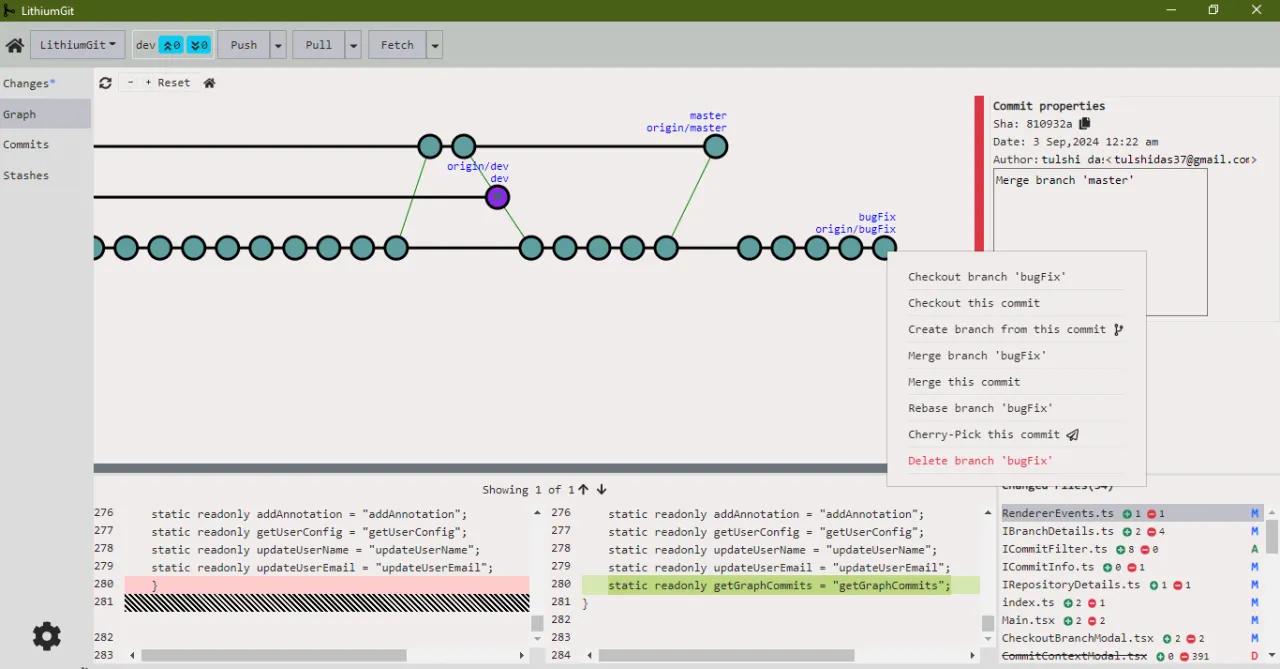
- Advanced Git Operations: Execute complex Git commands like rebase, cherry-pick, and interactive staging directly from the GUI.
- Interactive Graph View: Visualize your repository’s history, branches, and merges with a dynamic and interactive commit graph.
- Cross-Platform Compatibility: Enjoy seamless functionality on Windows, macOS, and Linux, ensuring a consistent experience regardless of your operating system.
- Customizable Workflows: Adapt the tool to your preferred development style with customizable settings and configurations.
- Origin-Independent: Work with any Git hosting platform, offering flexibility without vendor lock-in.
- Patch File Support: Easily export and import local changes using patch files for convenient code sharing and review.
- No Registration Required: Get started immediately without the need for account creation or logins.